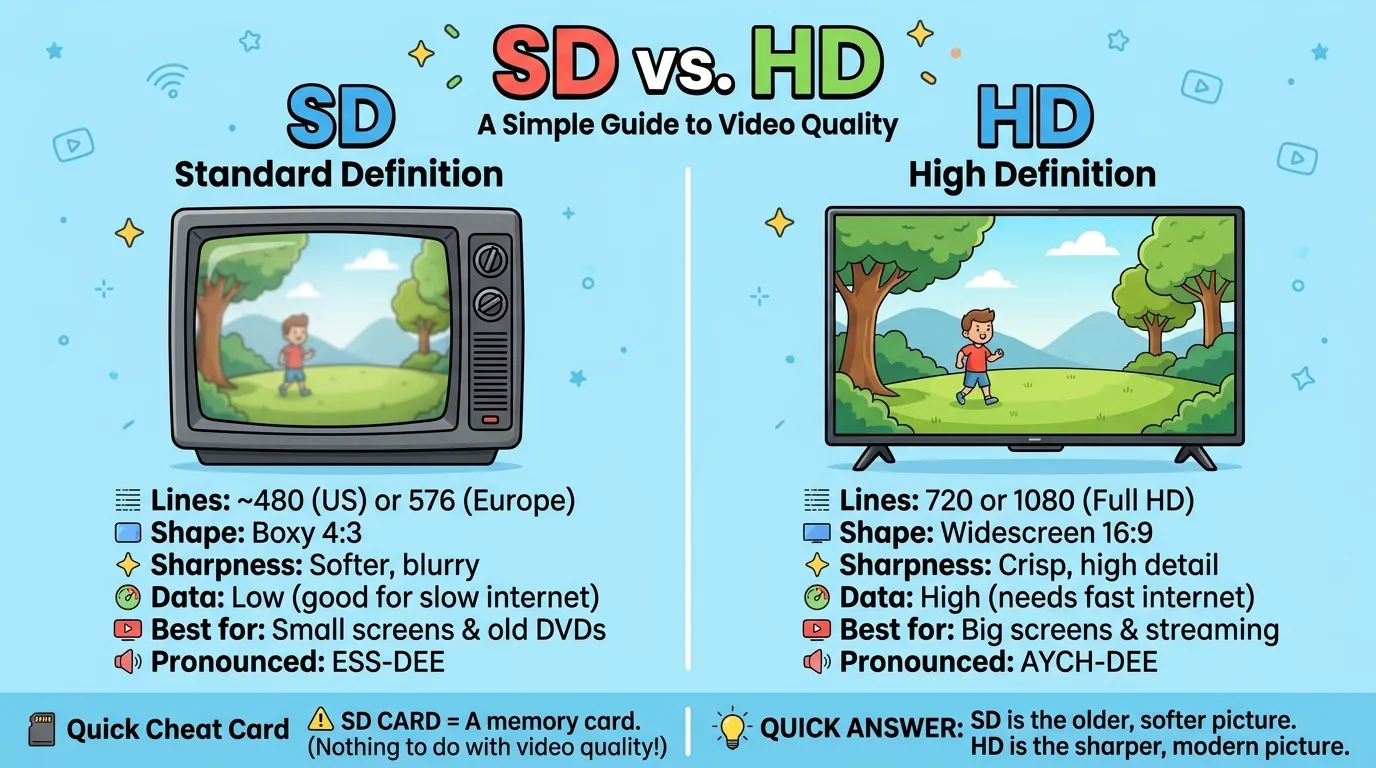
SD is the standard, older picture, and HD is the sharper picture with more detail.
Noah was watching cartoons on his tablet. The picture looked fuzzy and blurry. He asked his dad, “Why is it so blurry?” His dad tapped the screen and picked “HD.” The picture became clear, and Noah smiled. “Whoa!” he said. This is a simple example of SD vs HD and how HD can make a picture look clearer.
SD vs HD is a common question. SD means standard definition, while HD means high definition. In video, “definition” means how clear a picture looks. People search for SD vs HD when they see these labels on TVs, apps, and videos. They want to know which one to pick. This guide explains SD vs HD in simple words with easy examples. By the end, you will understand SD vs HD and know which option suits your screen and internet.
Pronunciation
You say each letter one by one.
- SD
- US: /ˌɛs ˈdiː/ (ESS-DEE)
- UK: /ˌɛs ˈdiː/ (ESS-DEE)
- HD
- US: /ˌeɪtʃ ˈdiː/ (AYCH-DEE)
- UK: /ˌeɪtʃ ˈdiː/ (AYCH-DEE)
Some people in the UK and Ireland say “haitch” for the letter H. So you may hear “HAITCH-DEE.” Most people say “AYCH-DEE.”
The full names sound like this: “standard definition” and “high definition.” Now let’s look at the details.
Difference Between SD and HD
1. Full Meaning
SD means standard definition. HD means high definition.
- The old cartoon is in SD.
- The new movie is in HD.
2. Number of Lines
A picture is made of lines of tiny dots. SD has fewer lines. HD has many more. SD is often 480 lines in North America and 576 lines in Europe. HD starts at 720 lines. Full HD has 1080 lines.
- An SD video may have 480 lines.
- A Full HD video has 1080 lines.
3. Sharpness
HD has many more dots, called pixels. It shows small details more clearly. Full HD has about five times as many pixels as SD.
- In SD, a person’s hair looks soft and blurry.
- In HD, you can see each strand.
4. Shape of the Picture
SD has a boxy shape, called 4:3. HD has a wide shape, called 16:9. The wide shape is close to what you see at the movies.
- Old TV shows fill a boxy screen.
- New movies fill a wide screen.
5. Fit on the Screen
On a wide TV, SD shows black bars on the sides. HD fills the whole screen.
- An SD show looks squeezed in the middle.
- An HD show fills the screen edge to edge.
6. Amount of Data
HD videos use more data. SD videos use less.
- An HD movie takes up more space on your phone.
- An SD movie takes up less space.
7. Internet Speed
HD needs a faster internet link. SD works on a slower link.
- A fast link can play HD without pauses.
- A slow link may only play SD without stops.
8. Look on Big and Small Screens
SD can look okay on a small phone screen. On a big TV, it looks blurry. HD looks good on both.
- SD is fine on a small phone.
- SD looks soft on a big TV.
9. Age and Era
SD was the normal for many years. HD became common later. In the US, the first digital HD broadcast was in October 1998. Japan started regular HDTV earlier, in 1989, with an older analog system.
- Old shows and DVDs are often SD.
- Streaming and new TVs use HD.
10. Equipment
SD works on old TVs. HD needs an HD TV or screen.
- An old TV from the 1990s shows SD.
- A new smart TV shows HD.
Before and After: Fix It Fast
See the mistake. See the fix. Read the reason.
1.
❌ Before: “SD means super definition.”
✅ After: “SD means standard definition.”
Why: “Standard” means the normal, older level.
2.
❌ Before: “This 480p video is HD.”
✅ After: “This 480p video is SD. HD starts at 720p.”
Why: More lines mean HD.
3.
❌ Before: “SD is always better because it loads fast.”
✅ After: “SD loads faster, but HD looks sharper.”
Why: Each has a trade-off. SD saves data. HD gives quality.
4.
❌ Before: “Put the SD card in the TV to make the picture HD.”
✅ After: “An SD card is memory. It does not change picture quality.”
Why: SD card means Secure Digital card. It stores files.
5.
❌ Before: “My HD is full, so my TV is not sharp.”
✅ After: “My hard drive (HD) is full. My TV sharpness is a different thing.”
Why: HD can also mean hard drive. It is not about picture quality.
Nature and Behaviour of SD and HD
SD
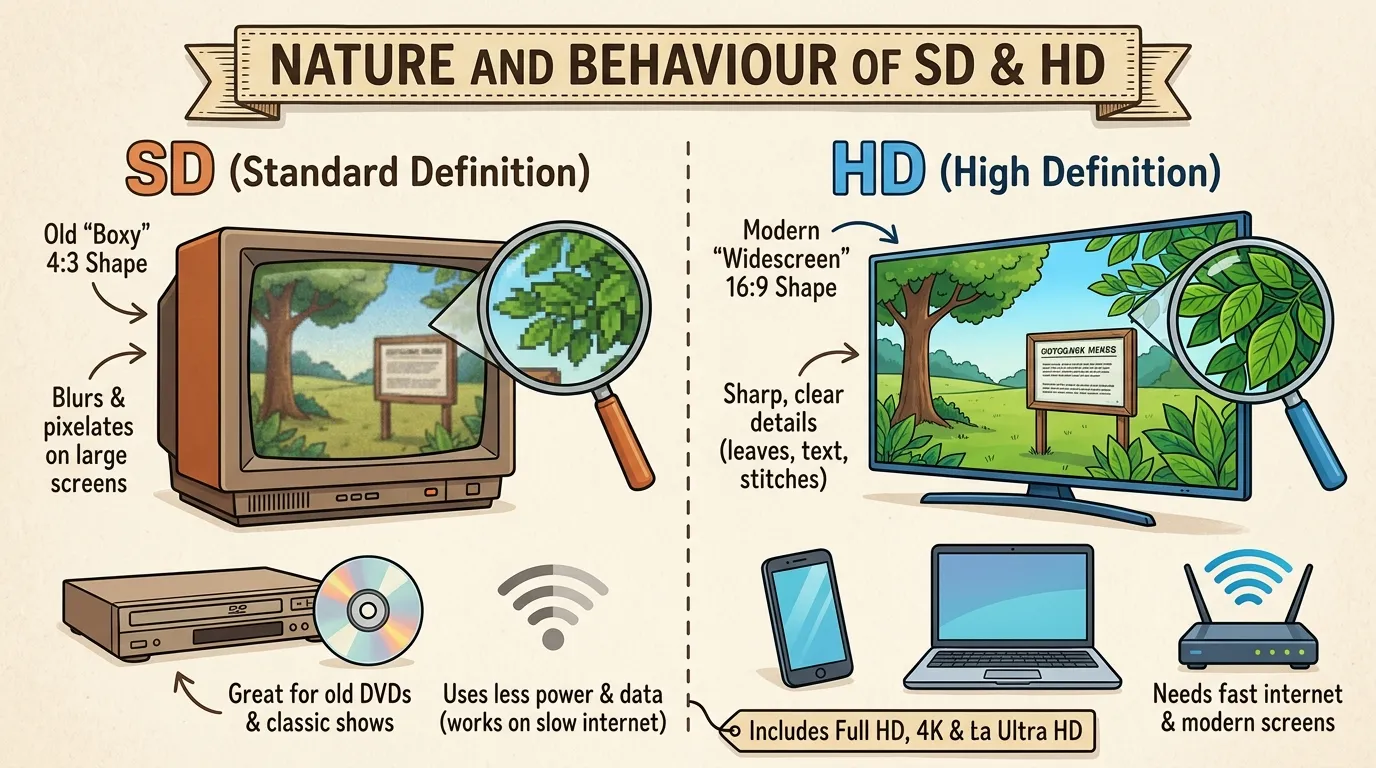
SD is the older way of showing pictures. It is like a small photo blown up. On a big screen, you can see blocks and blur. It works fine for small screens and slow internet.
SD is also the old shape. It is boxy, close to a square. Old TV shows were made for this shape. That is why many old shows look tall and narrow on a modern TV.
SD does not need much power or data. A weak internet link can still play it. Many old DVDs and old TV shows are still in SD.
HD
HD is the newer, sharper way. It packs many more pixels into the screen. Small things show up clearly: leaves on a tree, stitches on a shirt, or the words on a sign.
HD uses a wide shape, called widescreen. It shows more on the sides. It feels closer to a movie theater.
HD needs more power and data. A fast internet link helps. It also needs a screen that can show it. A new phone, a new TV, or a new computer screen will do.
There are levels above HD too. Full HD is 1080 lines. 4K and Ultra HD have even more. But the basic split is SD, HD, and Full HD.
Why People Get Confused About SD and HD
There are five simple reasons.
The letters look alike. Both are two-letter short forms. It is easy to mix them up.
HD has no strict rule. There is no single standard meaning for HD. In general, any picture with more than 480 lines in North America, or 576 lines in Europe, is called HD.
Other meanings exist. SD can also mean a memory card, a math term called standard deviation, or the state of South Dakota. HD can also mean a hard drive.
Extra labels add noise. Full HD, Ultra HD, 4K, 1080p, and 720p can feel like a long list.
Apps hide the setting. Many apps pick “Auto” quality. You may not know if you are watching SD or HD.
The fix is easy. Ask, “How sharp is the picture?” If it is soft and blurry, it is likely SD. If it is crisp and clear, it is likely HD.
Read more about:https://verboix.com/miter-or-mitre/
Comparison Table
| Point | SD | HD |
| Full meaning | Standard definition | High definition |
| Lines | About 480 (US) or 576 (Europe) | 720 or 1080 |
| Sharpness | Softer | Sharper |
| Shape | 4:3 (boxy) | 16:9 (wide) |
| Data use | Low | High |
| Internet need | Slow is okay | Faster is best |
| Best for | Small screens, slow links | Big screens, fast links |
| Equipment | Old TVs work | Needs an HD screen |
| Example | An old cartoon | A new movie |
| Similarity | Both show moving pictures on a screen | Same |
The Origin of SD and HD
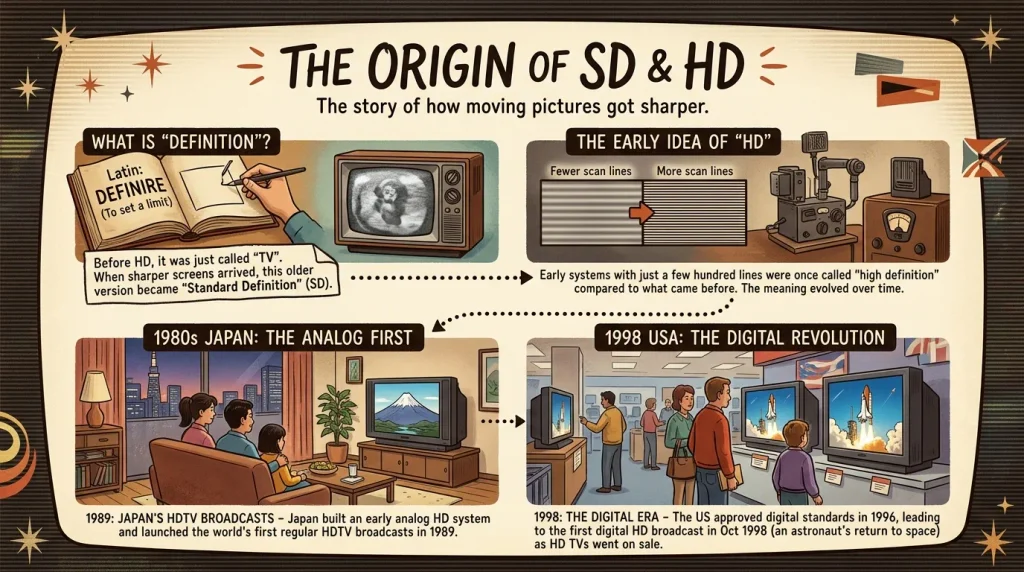
The word “definition” here means how clear and sharp a picture is. It comes from a Latin word that means “to set a limit.” In pictures, more definition means more detail.
Standard definition got its name after HD arrived. Before that, people just called it “TV.” When a sharper picture came, people needed a name for the old one. So they called it “standard definition.”
High definition is an older idea than it seems. Long ago, TV systems with a few hundred lines were called “high definition” when compared to even earlier ones. Later, the word moved to modern digital TV.
In the 1980s, Japan built an early HD system. In 1989, Japan started the world’s first regular HDTV broadcasts. It used an analog system. Later, digital systems replaced it.
In the US, a group set new digital TV standards. The government approved the standard in 1996. The first digital HD broadcast took place in late October 1998. It was the live coverage of an astronaut’s return to space. New HD TVs went on sale in the same year.
British vs American English
The spelling of SD and HD is the same in both countries. Only small things change.
- Spelling: SD, HD, and “definition” are the same in the US and UK. But nearby words differ. Americans write “program” and “color.” Britons write “programme” and “colour.”
- Rules: Same. SD is standard. HD is high.
- Sound: Both say “ESS-DEE” and “AYCH-DEE.” Some Britons say “HAITCH-DEE.”
- Lines: SD in the US often has 480 lines. SD in Europe often has 576 lines. This came from two older TV systems, called NTSC and PAL.
Examples:
- US: “This program looks great in HD. The color is rich.”
- UK: “This programme looks great in HD. The colour is rich.”
Which One Should You Use?
Use one rule: pick HD when you can. Pick SD when you must.
- For US and UK users: Use HD on modern TVs and fast internet. Use SD when your data is limited.
- For global users: Choose the level that your screen and your link can handle. Many apps have a setting for this.
- For writing: Spell out “standard definition” and “high definition” the first time. Then use SD and HD.
If your link is slow, drop to SD. Videos will pause less. If you watch on a big screen with a fast link, pick HD.
Common Mistakes
Here are more common errors, with fixes.
- ❌ “HD stands for high density.” ✅ “HD stands for high definition.” (In some tech uses, “high density” is a different term.)
- ❌ “SD means small definition.” ✅ “SD means standard definition.”
- ❌ “All videos on the internet are HD.” ✅ “Many videos are HD, but some are SD.”
- ❌ “More pixels always means a better movie.” ✅ “More pixels mean a sharper picture. The story is up to the movie.”
- ❌ “SD card and SD video are the same.” ✅ “An SD card is a memory card. SD video is a lower-quality picture.”
- ❌ “My old TV can show HD if I get a cable.” ✅ “An old SD TV cannot show HD, even with a new cable.”
Everyday Usage Examples
In emails
- “Please send the video in HD so we can see the details.”
- “We can send an SD copy if the file is too big.”
On social media
- “Watching the show in HD. The colors look amazing! 📺”
- “My old cartoon is in SD, but I love it.”
In the news
- “The channel now streams in HD.”
- “Older shows are being upgraded from SD to HD.”
In formal writing
- “Standard-definition (SD) video uses fewer lines than high-definition (HD) video.”
- “The report shows how HD has replaced SD in most homes.”
Usage Trends
People use SD and HD all over the world. HD is now the normal on most TVs, phones, and streaming apps. SD is used mostly for old shows, old DVDs, and slow internet.
Many videos let you pick a quality level. You might see 480p, 720p, and 1080p. 480p is often called SD. 720p and 1080p are HD. Many sites also offer 4K for larger screens.
People search for the difference because they see the labels on many devices. They also want to save data. Choosing SD can cut the amount of data used by a video.
Metaphors and Similes
SD
- “The memory was an SD photo, soft and faded.” (metaphor)
- “The old TV picture was like a dream, soft around the edges.” (simile)
HD
- “Her mind was in HD. She saw every detail.” (metaphor)
- “The morning was as clear as an HD screen.” (simile)
SD shows things that are blurry or old. HD shows things that are clear and sharp.
Connotative Meaning
SD
- Positive: “The old show in SD has a cozy, old-time charm.” It shows warmth and memory.
- Neutral: “This video is in SD.” It states a fact.
- Negative: “The SD picture looked blurry on the big screen.” It shows a weak quality.
HD
- Positive: “The HD view showed every detail.” It shows clarity and quality.
- Neutral: “The video is in HD.” It states a fact.
- Negative: “HD was too sharp. Every flaw showed.” It can show too much detail.
Idioms and Proverbs
There are no well-known idioms that use SD or HD. But these phrases fit the idea of a clear or blurry picture.
- Crystal clear: “The message was crystal clear.”
- As clear as day: “The answer was as clear as day.”
- See the big picture: “Let’s step back and see the big picture.”
- Up to standard: “The picture was not up to standard.”
- Seeing is believing: “I did not trust it, but seeing is believing.”
Proverb
- “A picture is worth a thousand words.” It means a clear image can say more than a long talk.
Literature and Movies

No famous book or movie is about SD or HD. But screens and pictures play a big part in many stories.
Literature
- Fahrenheit 451 (science fiction novel, Ray Bradbury, 1953): People spend hours watching large wall screens in their homes.
- 1984 (dystopian novel, George Orwell, 1949): Screens in every home watch and talk to the people.
Movies
- The Truman Show (1998, United States): A man lives his whole life on a TV show without knowing it. It came out in the same year as the first US digital HD broadcast.
- Network (1976, United States): A film about TV news and the power of the screen.
- Avatar (2009, United States): A film known for its sharp, detailed pictures.
Why This Difference Matters
For learners: Knowing SD and HD helps you pick the right video for study. A clear picture helps you see charts, maps, and small text.
For work: Presentations, video calls, and training videos look better in HD. But a slow link may need SD. Knowing the choice helps you avoid stops and freezes.
For society: Video is a big part of how we learn, share news, and stay in touch. Clear words help people choose what works for them. It also helps families with slow or costly internet save data with SD.
Usefulness in Daily Life
At home: You pick HD for a movie night. You pick SD when the internet is slow.
On your phone: You switch to SD to save data on a trip. You switch to HD when you are on Wi-Fi.
At school: A teacher plays an HD video so the class can see small details.
At work: You set video calls to HD for meetings. You drop to SD when the link is weak.
In shopping: A TV box says “HD Ready” or “Full HD.” You now know what these labels mean.
A Quick Test You Can Use
Ask these three questions:
- Do I have a fast internet link? If yes, pick HD.
- Am I on a small screen or short on data? Pick SD.
- Am I watching on a big TV? Pick HD.
Video Quality Labels
| Label | What it means |
| 480p | SD |
| 720p | HD |
| 1080p | Full HD |
| 4K | Ultra HD (even sharper) |
Situational Preference
Pick your level by asking where and how you watch. When comparing SD vs HD, think about your screen and internet speed. On a big TV with a fast internet link, pick HD. SD is enough for a small phone screen or when you have little data. During a long trip, SD helps you save data. For a movie night, HD gives you a clearer picture. If your signal is weak during a video call, SD may help stop freezing. Old shows and DVDs often look best in SD because that is how they were made. For school notes or training videos with small text, choose HD to see the words more clearly. When unsure, try HD first. If the video pauses, switch to SD. This simple SD vs HD guide helps you choose the right setting.
Print and Save: Cheat Card
Take a screenshot or print this card. Keep it on your phone.
| SD | HD | |
| Means | Standard definition | High definition |
| Lines | About 480 or 576 | 720 or 1080 |
| Shape | 4:3 (boxy) | 16:9 (wide) |
| Sharpness | Softer | Sharper |
| Data use | Low | High |
| Best for | Small screens, slow links | Big screens, fast links |
| Not to mix up | SD card = memory | HD = hard drive (sometimes) |
Quick Answers
1. What is the difference between SD and HD?
SD is standard definition, a softer picture with fewer lines. HD is high definition, a sharper picture with more lines.
2. How many lines does SD have?
About 480 in North America and 576 in Europe.
3. Is 720p HD?
Yes. 720p is the first level of HD. 1080p is called Full HD.
4. Why does my video look blurry?
It may be in SD. Or your internet link may be slow, so the app dropped the quality. Try setting the video to HD.
5. Does HD use more data than SD?
Yes. HD uses more data because it has more detail.
6. What is an SD card?
A Secure Digital (SD) card is a memory card that stores files, such as photos and videos. However, it does not affect picture quality.
7. Are the letters said the same in the US and UK?
Yes, “ESS-DEE” and “AYCH-DEE.” Some people in the UK say “HAITCH-DEE.”
Conclusion
At first, SD vs HD may seem confusing, but the difference is simple. SD means standard definition and gives a softer picture, while HD means high definition and shows more detail. When comparing SD vs HD, remember that SD uses less data and works well on older screens. In contrast, HD needs more data and a faster internet link. SD usually has 480 or 576 lines, while HD has 720 or 1080 lines. The labels are the same in British and American English. When choosing SD vs HD, check your screen and internet speed. Pick HD for a sharper picture or SD to save data. Now you can explain SD vs HD with ease and choose the right setting for every video.